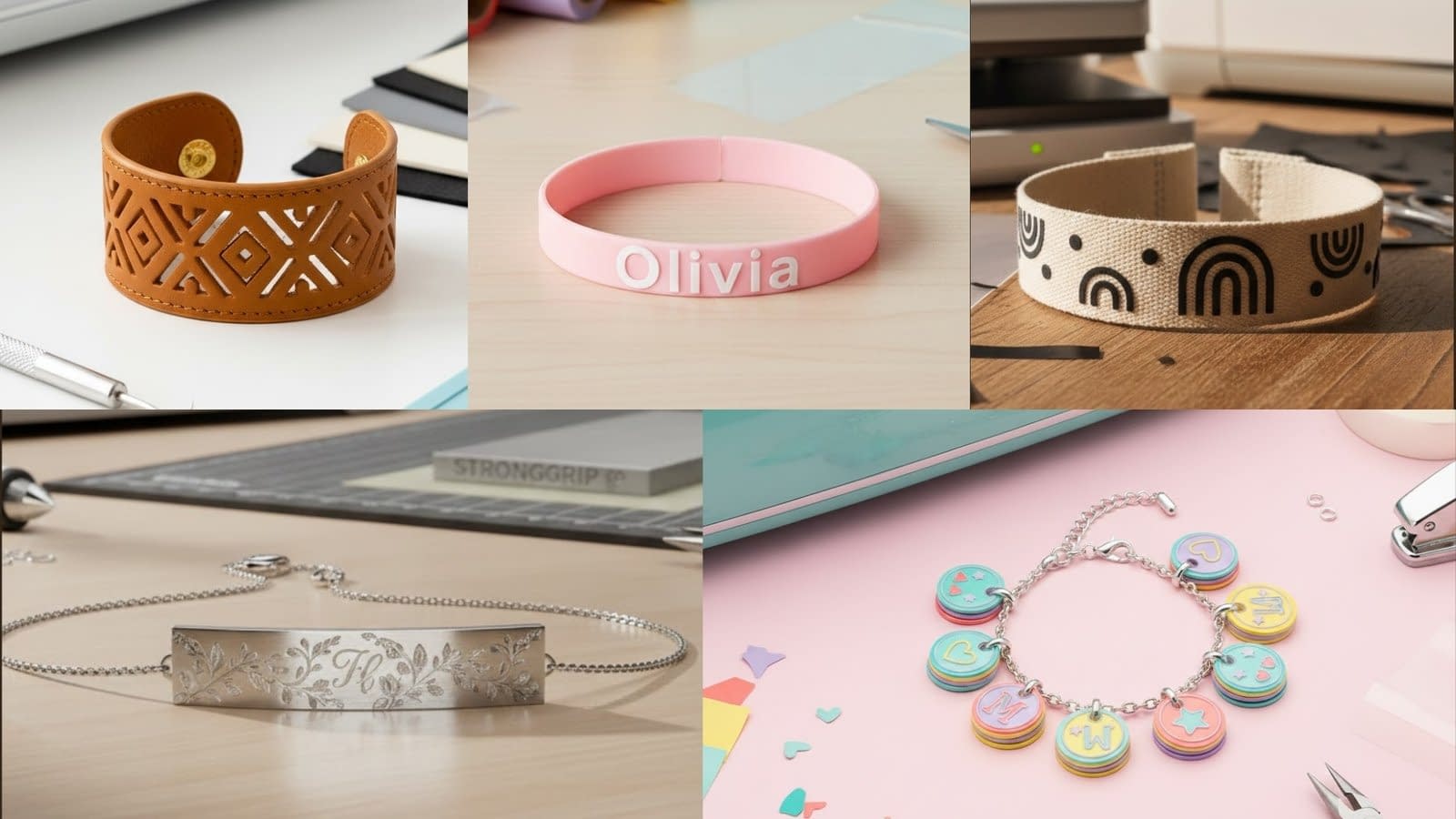
Crafting bracelets with a Cricut machine opens the door to endless customization, material options, and professional-quality finishes, even if you’re working from home. This guide on 5 Cricut bracelets is created for crafters who want complete clarity in every step, from design preparation to cutting, assembly, and finishing. Each tutorial includes the type of Cricut machine needed, the ideal materials, and detailed instructions on how to cut, fold, glue, engrave, press, and assemble the bracelets.
Faux Leather Cuff Bracelet (Cricut Maker or Explore)

A faux leather cuff bracelet is one of the most popular Cricut accessories because it looks high-end but is simple to make. With clean edges, flexible material, and customizable cuts, this project offers great results without needing advanced tools. You can create geometric patterns, floral cutouts, name-inspired designs, or textured bands.
Materials Needed
Faux leather sheet
StrongGrip mat
Fabric or standard Cricut blade
Snap fasteners or metal button studs
Hole punch tool
Jewelry pliers
Strong craft glue (if needed for layered pieces)
Preparing the Faux Leather
Before cutting, flatten the faux leather by gently rolling it in the opposite direction of the curl. Lay it on the StrongGrip mat with the textured side down and backer side facing up. Press it firmly onto the mat using your fingers, then use a brayer to secure it fully. This prevents the material from shifting during cutting.
Designing the Cuff in Cricut Design Space
Choose a cuff design template or draw your own shape. The ideal width ranges from 1 to 2 inches, depending on whether you want a slim or bold bracelet. The length typically falls between 6.5 and 8 inches, depending on wrist size. Make sure to include small holes on each end for the snap fasteners. If your design includes cutout details, ensure they are at least 0.1 inches thick to prevent tearing.
Cutting the Faux Leather
Select “Faux Leather (Paper Thin)” or “Faux Leather” depending on material thickness. Use the Cricut Fine-Point Blade.
Allow the machine to complete all cuts before lifting the mat. Slowly peel the leather away from the mat by bending the mat downward instead of pulling the material upward. This prevents curling or stretching.
Stitching, Folding, and Gluing (If Applicable)
If your design has two layers or decorative strips, follow these steps:
- Lay the larger base strip flat.
- Apply a thin line of strong craft glue on the back side of the smaller strip.
- Position the smaller piece directly centered on the base layer.
- Press gently with your fingers to secure.
- Place a heavy object (like a book) on top for 10 to 15 minutes so the glue sets evenly.
When folding areas or wrapping strips around the cuff:
- Pre-fold gently before gluing.
- Follow the curve of the wrist shape so the material bends naturally.
- Avoid creasing by using slow, gradual pressure instead of sharp folds.
Adding the Snap Fasteners
Use a hole punch to create clean holes where the snaps will be placed. Insert the male and female snap components. Using jewelry pliers, press the snaps together one at a time until secure. Snap them open and closed a few times to test durability.
Finishing the Bracelet
Trim any uneven edges using sharp scissors. Smooth the edges using your fingers or by lightly sanding the edge with a very fine grit file if necessary. Your faux leather cuff bracelet is now ready, with a clean professional finish.
Personalized Vinyl Name Bracelet (Cricut Joy)

This bracelet is ideal for those wanting small, personalized accessories. The Cricut Joy is perfect for cutting thin vinyl letters that adhere to silicone or faux leather bands. This project works well for names, dates, or short inspirational words.
Materials Needed
Silicone bracelet blank or faux leather strip
Permanent adhesive vinyl
Transfer tape
Cricut Joy mat
Scraper tool
Scissors
Preparing the Bracelet Surface
If using a silicone bracelet, clean it with rubbing alcohol so the vinyl adheres smoothly. Allow it to dry completely before adding vinyl. If you’re using faux leather, smooth out the surface and clean dust or stray fibers.
Designing the Name or Word
In Design Space, select a clear, readable font. For bracelets, thin scripts or extremely bold fonts can peel, so aim for medium-weight fonts. Keep the name height around 0.3–0.5 inches for a perfect fit.
Mirror is not needed for adhesive vinyl.
Cutting the Vinyl
Place the vinyl shiny side up on the mat. Cut at the recommended “Vinyl (Permanent)” setting. Once cutting is complete, weed the letters carefully using a weeding tool. Remove all excess vinyl around and inside the letters.
Transferring the Vinyl Letters
Cut a small piece of transfer tape slightly larger than your word. Place the transfer tape on top and burnish using a scraper tool. Peel the backing slowly until only the letters remain on the transfer tape.
Place the transfer tape centered on the bracelet:
- Start from the middle of the word.
- Press downward slowly so the tape lays flat without bubbles.
- Use your finger to press the vinyl into the bracelet surface.
- Peel the transfer tape away at a low angle to avoid lifting the vinyl.
Finishing Touches
Press down each letter again with your fingertip to ensure strong adhesion. Allow the bracelet to rest for 24 hours before wearing so the vinyl cures properly.
Engraved Aluminum Bar Bracelet (Cricut Maker + Engraving Tip)

Engraved bracelets look like professional jewelry. With the Cricut Maker and the engraving tip, you can etch clean, precise designs into metal bracelet blanks to create personalized gifts or accessories.
Materials Needed
Cricut Maker
Engraving tip
Aluminum bar bracelet blank
StrongGrip mat
Tape (masking or painter’s tape)
Jewelry pliers
Polishing cloth
Preparing the Metal Blank
Place the aluminum blank on the StrongGrip mat. Position it exactly where the design will engrave. Secure all four sides tightly with masking tape to prevent movement during engraving. Press the tape edges down firmly.
Designing the Engraving Pattern
Use simple line drawings, initials, coordinates, or minimal floral outlines. Align the design precisely by matching the blank’s placement on your mat grid in Design Space. Make sure the design does not exceed the blank’s size.
Engraving Process
Load the engraving tip into the Cricut Maker. Set material to “Aluminum Sheet (0.5mm)” or “Metal Engraving Blank” if available.
When engraving:
- Allow the machine to complete all passes without interruption.
- The machine will engrave slowly, creating clear grooves.
- Do not lift the mat until the entire process finishes.
Removing the Engraved Blank
Peel the tape away carefully. Lift the metal blank from the mat without bending it. Use a polishing cloth to wipe away metal dust and brighten the grooves.
Shaping the Bracelet
Most aluminum blanks come flat. Use jewelry pliers or a bending bar to shape the bracelet:
- Hold the blank at one end.
- Gently curve it around a bracelet mandrel or cylindrical object.
- Shape gradually, adjusting both ends so the curve matches the wrist shape.
This slow method prevents bending marks and keeps the bracelet smooth.
Layered Vinyl Charm Bracelet (Colorful and Playful)

This bracelet uses layered vinyl pieces to create unique charms. You can cut shapes, letters, icons, and small motifs, then attach them to a bracelet chain using jump rings.
Materials Needed
Acrylic discs or shrink-plastic discs
Permanent vinyl in multiple colors
Transfer tape
Jump rings
Bracelet chain
Jewelry pliers
Hole punch (if using shrink plastic)
Preparing the Charm Bases
If using acrylic discs, make sure each disc has a clean surface and a pre-cut hole. If using shrink plastic sheets:
- Cut circles using the Cricut.
- Punch a small hole at the top for the jump ring.
- Bake the pieces according to package instructions so they shrink and thicken.
Cutting the Vinyl Layers
Choose charm shapes such as stars, hearts, initials, or mini themed icons. Each charm can include two to three vinyl layers for depth.
- Cut the base layer first.
- Weed gently around the smallest shapes.
- Apply transfer tape for each layer.
- Stack layers slowly so edges align cleanly.
Attaching Vinyl to the Discs
Place the base vinyl layer on the disc first. Press firmly to remove bubbles. Add the second and third layers by aligning outer edges and using light pressure to keep the stack precise.
Assembling the Bracelet
Open jump rings using jewelry pliers. Attach each charm through the pre-cut hole and secure them onto the bracelet chain. Space each charm evenly so they hang without overlapping.
Heat-Transfer Vinyl Fabric Bracelet (Soft Cotton + HTV)

This bracelet combines the softness of cotton webbing with the clean precision of Cricut-cut HTV designs. The result is lightweight, flexible, and comfortable for all-day wear.
Materials Needed
Cotton webbing (cream or natural color)
Heat-transfer vinyl (HTV)
Cricut EasyPress Mini
Protective Teflon sheet
Scissors
Measuring tape
Snap fasteners or Velcro closure
Preparing the Fabric Band
Measure the wrist and cut the cotton webbing accordingly. Add an extra ½ inch on each end for closures. Make sure the cut edges are clean; if frayed, trim threads before continuing.
Designing the HTV Pattern
Choose minimal designs such as dots, lines, geometric arches, or organic shapes. Keep each design simple so it adheres smoothly onto the textured fabric.
Cutting the HTV
Mirror your design before cutting. Place the HTV shiny side down on the mat. Cut using the fine-point blade. Once finished:
- Weed away the negative space.
- Keep only the shapes you want to transfer.
Positioning the HTV on the Bracelet
Lay the cotton band flat on a heat-resistant surface. Arrange the HTV shapes before pressing. Make sure the spacing is even and the shapes align straight along the length of the band.
If you need perfect alignment:
- Fold the band lightly in half to create a center guideline.
- Do not crease sharply; just form a soft guide.
- Place the HTV shapes relative to this fold for symmetry.
Pressing the HTV
Place a Teflon sheet over the bracelet. Use the Cricut EasyPress Mini on medium heat. Move the press slowly in small circles for 8–12 seconds per area. The HTV should bond fully and appear smooth against the cotton surface.
Adding the Closure
Use snap fasteners or Velcro.
For snaps:
- Punch small holes on each end.
- Insert the snap components.
- Secure firmly using pliers.
For Velcro:
- Cut two small squares.
- Glue or sew lightly onto each end of the bracelet.
- Allow glue to dry fully before wearing.
Final Thoughts
These 5 Cricut bracelets offer incredible versatility, whether you’re making bold faux leather cuffs, minimalist engraved metal pieces, playful layered charms, or soft fabric bracelets enhanced with HTV. With the detailed instructions provided, you can achieve professional-quality results even as a beginner. The key is working slowly, preparing materials properly, aligning designs carefully, and using the tools at the right moment in each step. By mastering these five methods, you can expand into more advanced bracelet designs and grow your crafting skills significantly.